Google Business Profile Requires Video Verification: What Can You Do?
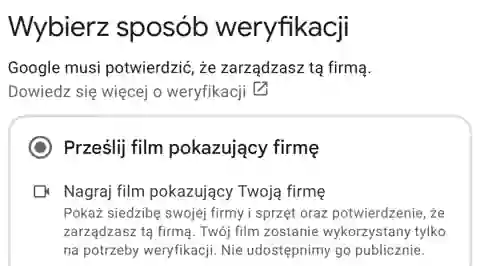
The panel requests a video recording, but the owner of the company does not have a recording or can not easily present the headquarters.
Example error screen
A sample of the issue in the application interface. Use the diagnostic steps below to identify the cause.
The Most Important Cause
Google displays available verification methods depending on the profile. It is not always possible to switch them to another variant.
Practical procedure
1. Check the exact verification manual displayed in the panel, not the general list in the guide.
2 . Determine what real elements of the activity can be shown: equipment, marking or working tools, as instructed.
3 . Check that the panel offers an alternative method; do not assume that it is available to any company.
4 . If the recording is impossible, report the problem through the official support channel.
5 . Do not change your address or company category fictitiously just to force a different type of verification.
How do I confirm the result?
The verification is carried out by a Google approved method, with real materials and correct company data.
A replacement verification cannot be guaranteed without video; the decision depends on Google.